


A product priced at $49.00 USD may look perfectly reasonable to US customers. But after currency conversion, the same product could appear as €42.37, ¥7,483, or £36.81 in other markets. These amounts might be mathematically accurate, yet they may not fit the pricing conventions shoppers expect.
That raises an important question for international Shopify merchants: should you keep exchange-rate conversions as they are, or round prices for a more familiar local shopping experience?
Shopify currency rounding is useful when converted prices create awkward endings, but rounding is not always the best approach. Stores that prioritize flexible exchange-rate pricing may prefer automatic conversion with rounding, while brands that need precise regional price positioning may benefit from fixed market prices.
The right choice depends on your margins, target markets, payment setup, and whether the price customers see on the storefront matches what they actually pay at checkout.

Image source: Shopify — Ecommerce Localization.
Why Converted Shopify Prices Look Unusual
Automatic currency conversion produces prices based on exchange rates and applicable pricing adjustments rather than local merchandising conventions.
Exchange rates create uneven price endings
Suppose a US-based accessories brand sells a leather laptop sleeve for $49.00.
When customers browse from different countries, the equivalent converted price depends on the relevant exchange rate and the store's currency settings.
For illustration, a simple conversion might produce these amounts:
| Market | Illustrative Converted Price | Possible Rounded Display |
|---|---|---|
| United States | $49.00 | $49.00 |
| Germany | €42.37 | €42.00 or €43.00 |
| Japan | ¥7,483 | ¥7,500 |
| United Kingdom | £36.81 | £37.00 |
Note: These figures are illustrative, not live exchange-rate quotes or guaranteed Shopify rounding outcomes. Actual prices depend on exchange rates, conversion fees, market settings, and supported rounding rules.
Uneven conversions are not automatically wrong. They become a pricing question when merchants want a more deliberate and recognizable local price presentation.
Local pricing conventions differ between markets
A familiar price ending in one country may feel unusual in another.
For example, shoppers in markets that commonly use whole-number prices may find long decimal amounts harder to scan. In other markets, endings such as .95 or .99 may be common merchandising choices.
These patterns are not universal rules. They vary by product category, retailer positioning, and local shopping expectations.
Instead of applying the same price ending everywhere, merchants should review how comparable products are presented in each target market.
Currency formatting is not the same as price rounding
Formatting changes how a numerical amount appears, while rounding changes the amount itself.
For example, a value might be displayed using a comma as the decimal separator or with a currency symbol in a different position. Those are presentation choices.
Changing €42.37 to €43.00, however, changes the product price.
Shopify's currency formatting documentation distinguishes the display of monetary values from Shopify Markets pricing behavior.
Merchants should not confuse hiding decimals visually with changing the actual transaction amount.
Live Exchange Rates vs. Rounded Local Prices
Both approaches can work for international stores, but they solve different pricing needs.
| Criteria | Live Conversion Without Rounding | Conversion With Rounding |
|---|---|---|
| Price calculation | Based on configured conversion logic. | Converted amount adjusted by rounding rules. |
| Price endings | Can appear uneven. | Follow supported rounding increments. |
| Exchange-rate changes | Converted prices may fluctuate. | Prices may also fluctuate, but in rounding increments. |
| Margin impact | Closely reflects the unrounded conversion formula. | Rounding can change the final selling amount. |
| Best fit | Merchants prioritizing straightforward converted pricing. | Merchants seeking cleaner local price presentation. |
| Main limitation | Unfamiliar decimal endings. | Less granular control over the final amount. |
When live conversion makes sense
Automatic conversion without additional rounding can be appropriate when a merchant wants prices to follow the configured exchange-rate calculation without introducing another pricing adjustment.
This may be useful for catalogs where product prices change frequently or where the business evaluates margins closely.
However, exchange-rate conversion is not necessarily a pure mathematical multiplication. Shopify's automatic local pricing can include a currency conversion fee before any rounding is applied.
See Shopify's currency conversion and exchange-rate documentation for the underlying calculation.
When rounded prices make sense
Rounding is more useful when awkward converted amounts undermine the intended price presentation.
For example, a home accessories brand may prefer whole-number prices across product cards so customers can compare items quickly.
A merchant operating across several currencies may also want to avoid inconsistent decimal endings caused by daily exchange-rate movements.
Rounding can make converted prices easier to read, although it does not guarantee better conversion rates or eliminate exchange-rate exposure.
When neither option is ideal
Some brands need specific prices for each country rather than a converted equivalent.
A product might need to sell for €49 in Germany and £45 in the United Kingdom because of positioning, operating costs, or competitive conditions.
In that situation, using exchange-rate conversion and hoping that rounding reaches the desired amounts is not a reliable pricing strategy.
Fixed product prices for individual markets provide a more direct way to define the intended amount.

Image source: Shopify — Ecommerce Localization.
How Shopify Markets Handles Currency Rounding
Shopify Markets provides native currency conversion and rounding controls for eligible stores selling internationally.
Conversion happens before rounding
For automatic conversion, Shopify calculates the local price using the base product price, exchange rate, and applicable conversion fee.
The simplified calculation is:
Converted price = Base price × Exchange rate × (1 + Conversion fee)
When an eligible rounding rule is enabled, Shopify applies rounding after the conversion and relevant price adjustments.
As a result, the final local price may differ from the raw exchange-rate equivalent.
According to Shopify's rounding documentation, rounding applies to converted product prices and shipping rates, while gift cards are excluded.
Shopify's native rounding uses defined increments
Shopify's rounding rules are designed around common currency increments.
Merchants can activate rounding for an eligible market, but they cannot arbitrarily customize those native rounding rules to produce any preferred ending.
For example, enabling Shopify's built-in rounding does not automatically mean every product can be forced to end in .99.
That distinction matters for merchants who have specific psychological pricing or regional merchandising requirements.
If a market needs exact product prices, use Shopify's market-specific pricing tools where supported rather than treating basic rounding as a replacement for fixed pricing.
Shopify Payments eligibility matters
Shopify's native price-rounding functionality requires Shopify Payments.
More broadly, Shopify's current multi-currency payment documentation identifies Shopify Payments and Adyen as eligible primary processors for customer payments in local currencies, subject to the applicable platform conditions.
Stores using other payment providers may display converted currencies on the storefront while charging customers in the store's default currency at checkout.
Before designing local price endings, confirm which payment processor your store uses and whether the intended checkout currency is supported.
How to Set Up Rounding in Shopify Markets
Eligible merchants can configure native rounding within the currency settings for an individual market.
Enable rounding for the target market
Based on Shopify's documented workflow:
- Open Shopify admin and navigate to Markets.
- Select the market you want to configure.
- Open the market's currency settings.
- Locate the price-rounding option.
- Select the available rounding rule.
- Save the configuration.
- Preview the resulting prices for representative products.
The exact wording and location of controls can vary with Shopify's current Markets interface.
Do not enable rounding across every market without reviewing how the resulting prices affect your catalog.
Preview low-priced and high-priced products
The same rounding policy can affect products differently depending on their starting price.
For example, a small rounding adjustment may be relatively minor on a premium product but more significant as a percentage of a low-priced accessory.
Check at least three price levels:
- Low-priced accessories.
- Core products with typical margins.
- Premium or high-value products.
Also review compare-at prices, promotional discounts, and any price-sensitive bundles in the markets where those features are used.
Review shipping rates separately
Shopify's rounding rules can also apply to converted shipping rates.
That means a merchant should not evaluate product prices alone.
Inspect the full cost of an illustrative order, including product prices, available shipping rates, discounts, and applicable taxes or duties.
The customer ultimately evaluates the amount they are asked to pay, not only the number displayed on an individual product card.
How GLC Supports Local Currency Price Display
GLC Geolocation Redirect & Currency App helps merchants present relevant currencies alongside country and language localization.
Its current Shopify App Store listing includes real-time currency conversion, multi-currency display, currency switching, price rounding, and price display features.
These capabilities are useful when international shoppers need clearer price information before reaching checkout.
Show familiar currencies during product discovery
Customers encounter prices long before checkout. Collection pages, product recommendations, product pages, and promotional sections all influence how shoppers compare offers.
GLC supports a currency switcher and geolocation-based localization workflow so visitors can view prices in a currency relevant to their shopping context.
For example, a visitor browsing from Japan may prefer to evaluate products in JPY instead of mentally converting USD prices.
This improves access to understandable price information, although the final transaction currency remains governed by the store's actual payment and market settings.
Use rounding as a display consideration
GLC currently lists price rounding among its currency conversion capabilities.
Merchants can evaluate the app's available rounding and display settings when deciding how converted prices should appear in their storefront.
However, a third-party price display feature should not be assumed to override Shopify Markets' authoritative checkout prices or payment calculations.
Check the available GLC settings and test the resulting prices in your own theme, market, and payment configuration before publishing changes.
Connect currency selection with market selection
GLC also supports country selection, language selection, and Shopify Markets-related routing.
These functions matter because a shopper's geographic location does not always match the country where they intend to receive an order.
A person browsing from France may be purchasing a gift for delivery in the United Kingdom.
Allowing customers to confirm their intended market and currency can help avoid confusion when the checkout uses a different shipping destination from the initially detected location.

Why Storefront and Checkout Prices Must Match
A clean-looking local price is not helpful if the customer encounters an unexpected amount or currency at checkout.
Displayed conversion does not guarantee local-currency payment
There is an important difference between showing an approximate converted amount and processing the customer's payment in that currency.
For stores without an eligible multi-currency payment configuration, a currency conversion app may display local prices while checkout continues in the store's default currency.
For stores with eligible Shopify Payments or Adyen configurations, Shopify Markets and checkout settings determine the currency used for the transaction.
Review the official Shopify international payments documentation before presenting storefront currency conversion as guaranteed local-currency checkout.
Shipping destination can change checkout currency
A shopper might select EUR while browsing but enter a UK shipping address at checkout.
Under eligible Shopify checkout configurations, Shopify may adjust the applicable market and currency based on the shipping destination.
This can create a visible price or currency change even if the original storefront conversion worked correctly.
Merchants should test the behavior rather than assuming every manual currency selection will be preserved through payment.
Watch for inconsistent price adjustments
Price mismatches can become more noticeable when several pricing mechanisms operate together.
Potential sources of inconsistency include:
- Storefront conversion and Shopify Markets conversion using different logic.
- Rounding being applied at different stages.
- Market-specific product prices overriding converted equivalents.
- Shipping rates being converted separately.
- Discounts being applied to already adjusted prices.
- A customer changing their shipping country during checkout.
The goal is not necessarily to produce the same number in every circumstance. It is to ensure that each change follows the store's intended pricing policy and is understandable to the customer.
How to Choose the Right Local Pricing Strategy
The best pricing model depends on whether your priority is exchange-rate responsiveness, simpler price endings, or direct regional price control.
| Merchant Requirement | Recommended Approach |
|---|---|
| Keep prices aligned with exchange rates | Automatic conversion without additional rounding. |
| Reduce awkward decimal endings | Automatic conversion with eligible rounding rules. |
| Set exact country-specific selling prices | Fixed market pricing where supported. |
| Control exchange assumptions manually | Manual exchange rates with regular reviews. |
| Help shoppers understand prices in familiar currencies | Appropriate localization and currency selection tools. |
| Guarantee a specific checkout price | Configure authoritative Shopify market pricing and payment settings. |
Use automatic conversion for operational simplicity
A merchant with a large catalog and several international markets may prefer automatic exchange-rate conversion because it reduces the need to maintain individual prices for every product and country.
Rounding can improve the presentation of those conversions when supported.
However, automatic conversion can still affect margins as exchange rates move, so merchants should monitor actual realized revenue rather than treating localized prices as permanently fixed.
Use fixed prices for deliberate regional positioning
Fixed market prices are more appropriate when the business intentionally wants to charge different amounts in different markets.
For example, a premium skincare brand may establish local prices based on distribution costs, competitor positioning, taxes, and its intended retail price architecture.
That is a broader commercial decision than simply making decimal endings cleaner.
Shopify provides market-level and product-level pricing capabilities for eligible configurations, allowing merchants to manage pricing more directly.
Consider rounding's effect on margins
Rounding can change the final customer-facing price, so its financial effect should be evaluated.
Consider an illustrative product whose converted selling price is €24.37.
If a chosen pricing approach results in €25.00 instead, the difference is €0.63 before considering other charges or costs.
For products with narrow margins or high sales volume, even small adjustments deserve attention.
Merchants should compare gross margin and competitive pricing after changes rather than assuming that rounder numbers are always financially beneficial.
Test Local Prices Across the Entire Buying Journey
Currency rounding should be evaluated from the first product impression through the final payment confirmation.
Create a market-by-market price test
Choose representative products and examine them in several target markets.
For each market, record:
- Storefront market and selected currency.
- Product page price.
- Collection page price.
- Cart subtotal.
- Checkout currency and line-item price.
- Shipping rate.
- Applied discount.
- Final checkout total.
Repeat this process using a low-priced product, a typical bestseller, and a premium product.
Where relevant, include orders with multiple quantities because line-item rounding and total calculations may not always resemble a simple multiplication of a visually displayed figure.
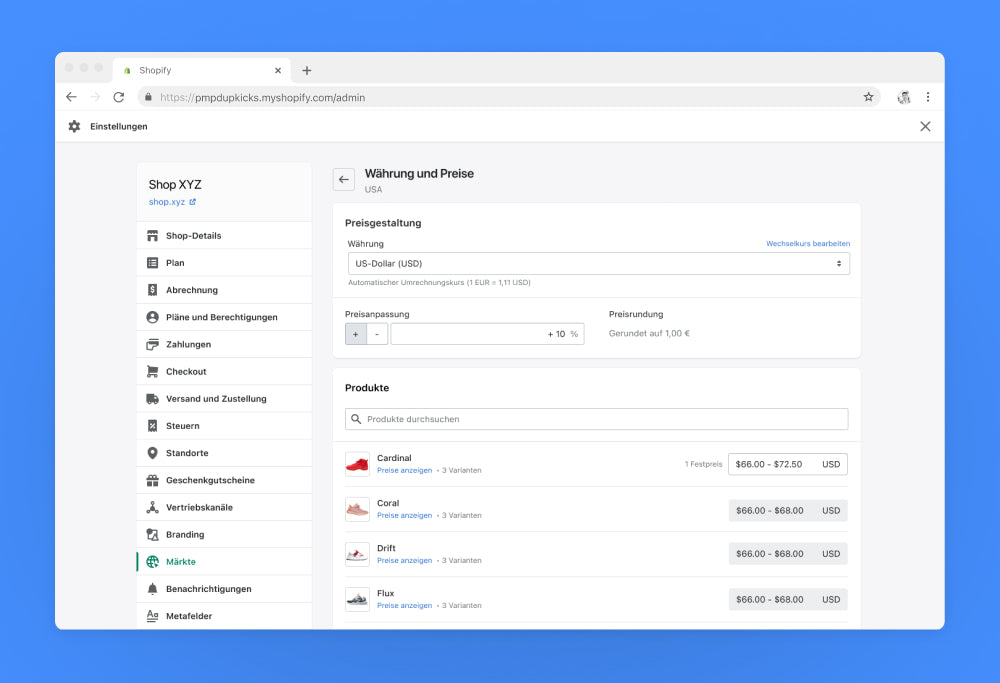
Image source: Shopify — Shopify Markets. Historical interface shown for illustration; current Shopify Markets controls may differ.
Compare automatic and fixed-price scenarios
When deciding between rounding and fixed market prices, do not evaluate only the visual appearance of one product.
Build a small comparison covering several products and currencies.
For example, compare whether automatic conversion produces acceptable prices for most of your catalog or whether a particular market needs deliberate price points across key products.
This gives the merchant a practical basis for choosing a pricing model.
Test country changes and mobile shopping
Switch between countries using the storefront selector and verify that prices update as intended.
Then test what happens when the shipping destination differs from the selected storefront market.
Also inspect mobile collection pages, product cards, cart drawers, and sticky add-to-cart elements. A currency label that appears correctly on desktop may be truncated or unclear on smaller screens.
For an app such as GLC, verify that currency-switcher placement does not interfere with important purchasing controls.
Shopify Currency Rounding Checklist
Use this checklist before introducing or changing local price rounding in an international Shopify store.
- Confirm payment eligibility: Check Shopify Payments, Adyen, and the applicable market or checkout restrictions.
- Review current converted prices: Identify which product categories actually need cleaner price endings.
- Choose the pricing objective: Decide whether you need automatic conversion, rounding, or fixed market prices.
- Check available rules: Verify Shopify's native rounding increments and any relevant GLC display settings.
- Evaluate margins: Compare the rounded price with the underlying converted amount.
- Inspect shipping and discounts: Test the complete order total, not only product prices.
- Validate checkout consistency: Confirm that the displayed storefront price and authoritative checkout pricing follow the intended configuration.
- Test market switching: Check how prices respond when customers change their country or shipping destination.
- Review performance: Monitor pricing complaints, conversion behavior, and gross margin after implementation.
The purpose is not to round every price. It is to establish a consistent approach that customers can understand and merchants can manage profitably.
Final Thoughts
Shopify currency rounding can make converted prices easier to read, but it is not a substitute for a complete international pricing strategy. Automatic conversion without rounding works when exchange-rate responsiveness matters most, rounding helps when uneven price endings affect presentation, and fixed market prices are better for deliberate regional positioning. Shopify Markets controls eligible native rounding and checkout pricing, while GLC supports localized currency display and switching. Merchants should choose their approach based on margin requirements, payment eligibility, and verified consistency across product pages, carts, and checkout.
FAQ
Does Shopify automatically round prices in different currencies?
Shopify supports currency rounding for eligible Shopify Payments stores, but merchants need to configure rounding in their market settings. The available rounding increments are defined by Shopify rather than freely customizable.
Can I make every Shopify product price end in .99?
Shopify's standard currency rounding does not provide unrestricted control over price endings. If you need exact regional prices, consider fixed market pricing where supported.
Does GLC price rounding change what customers pay at checkout?
GLC lists price rounding and currency conversion features, but Shopify's market and payment configuration determines authoritative checkout pricing. Test storefront and checkout amounts before assuming a display change affects the final charge.
Read More


